
A public link doesn’t automatically give you permission to download or share a video. ClipCatch.top is a free online video downloader for supported links, but copyright, the creator’s authorization, and platform terms still matter. Distributing copyrighted videos is illegal in the United States and many other countries; personal offline use is treated differently from commercial use.
It’s reasonable to want a clear answer before saving a clip. Learn which public platforms and links are supported, how MP4, MP3, and M4A formats differ, and what can affect the available resolution. This guide also explains how to approach permission and platform rules so you can choose an appropriate download method and use the file responsibly.
Key Takeaways
- Choose MP4 for a video file or MP3 and M4A when you only need audio.
- Check the quality options shown for the link before you save, since available resolutions can vary.
- Use a supported public link from platforms such as YouTube, Dailymotion, or Bilibili to start a download.
- Confirm you have permission to save and use a video, and consider copyright and platform terms before sharing it.
What video formats and resolutions are supported?
The format determines whether you save a video or extract its audio. Available resolution depends on the source link and the options shown before download.
Available Video Resolutions
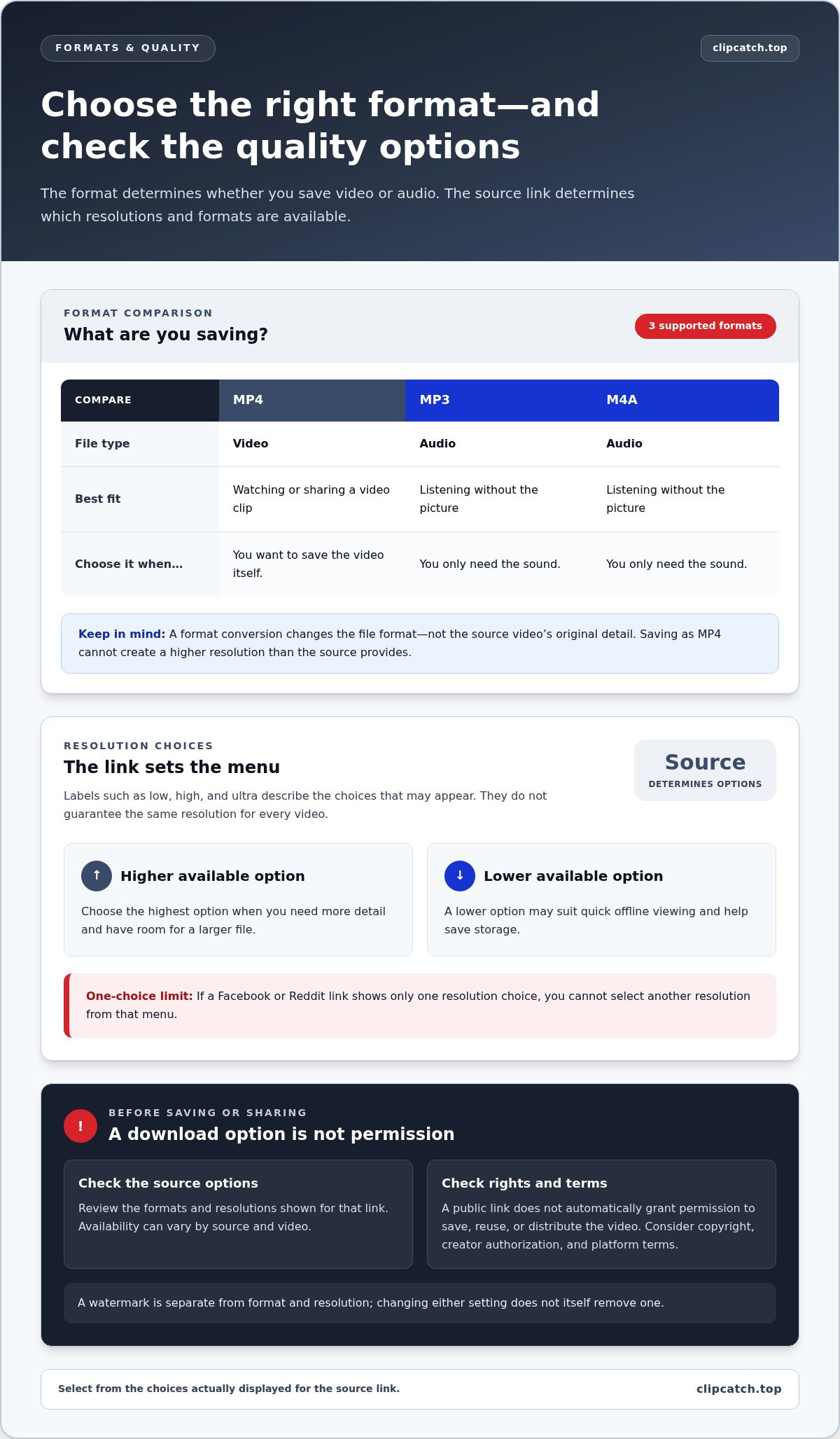
Check the resolution menu before saving. Labels such as low, high, and ultra describe the available options, but don’t guarantee the same resolution for every video. The source file and link determine what appears.
Choose the highest option when you need more detail and have room for a larger file. For quick offline viewing, a lower option may suit your screen and save storage. If a Facebook or Reddit link shows only one choice, you can’t select another resolution from that menu.
Video and Audio Formats
Available formats include MP4 for video and MP3 or M4A for audio. Choose MP4 to save a video clip; select MP3 or M4A when you only need its sound. These are the formats supported by ClipCatch.top.
Conversion changes the file’s format, not the source’s original detail. Saving a clip as MP4 won’t create a higher resolution than the video provides. A watermark is also separate from format and resolution, so changing either setting doesn’t itself remove one.
Before you save videos, match the file to its intended use. For example, choose MP4 for playback as a video, or an audio format for listening without the picture. Check the file extension after downloading so you know what you saved.
MP4 is a practical default for watching or sharing a video clip. MP3 and M4A suit audio-only use. A free online video downloader may show different choices for different links, so select from the options displayed rather than assuming every source offers every format or resolution.
IS IT LEGAL TO DOWNLOAD VIDEOS?
Legality depends on permission, copyright, and the platform’s terms, not on whether you use a browser or an app. Distributing copyrighted videos is illegal in the United States and many other countries; personal offline use is treated differently from commercial use.
In 2026, the best free online video downloader for a task is one that supports the source link and offers a suitable format. Browser tools work from a video link without installing an app, while desktop apps and browser extensions add software to your device and may offer different workflows.
On a desktop, paste the public video link into the tool, choose an available option, and save the resulting file. On mobile, open the same page in your browser, submit the link, then use the browser’s download control. Android devices usually save browser downloads in the device’s downloads area.
A browser-based tool works across desktop and mobile without a dedicated extension. An extension may detect media on a page, but it requires installation and browser permissions. Choose a browser-based tool to process a link directly; use an app only if its extra features suit your workflow.
Don’t assume an online downloader is safe or malware-free just because it runs in a browser. Avoid unexpected downloads, pop-ups, and requests to install unrelated software. Use a trusted browser and inspect the file before opening it.
Privacy and advertising practices vary by service. Read the page’s privacy information, avoid entering personal details, and close misleading prompts rather than clicking them. Pasting a video link is different from uploading a video file, so don’t upload a file unless the tool clearly requires it and you have permission.
For a public link, a browser-based video downloader offers a direct alternative to installing an extension.
Supported public video and social platform links
Link support depends on the downloader, not simply on whether a post is public. Supported sources include 9GAG, Bandcamp, Bilibili, Bitchute, Blogger, BuzzFeed, CapCut, Dailymotion, Douyin, ESPN, and YouTube. A public link from one of these platforms is a useful starting point, but public visibility alone doesn’t establish that every URL will work.
For a clean test, open the video’s page, copy its address, and paste the complete link into the downloader. Use the individual video page, not a profile or platform homepage. For example, a YouTube video address identifies a specific clip, while a channel address points to a collection of videos. Select the download button only after the tool recognizes the link and shows its available choices.
Social platforms use different link formats for posts, clips, and shared content. TikTok, Facebook, Instagram, X, and Reddit links are examples of social video URLs, but don’t assume every downloader supports them. Twitter is now called X; if a link still contains the older name, copy it from the post itself. Check ClipCatch.top’s supported platforms before relying on a particular link.
Compatibility can also depend on the page a link opens. A copied redirect, private post, or login-gated page may not work like a publicly accessible video page. If a link fails, return to the original post on YouTube or Dailymotion, copy its direct address, and try again. Don’t submit account credentials to make a video link work.
Quality choices vary by source and video. Review the options shown before saving; don’t assume every platform offers the same resolutions or formats. For example, compare the options for a YouTube clip with those for a Dailymotion video, then select one that suits your needs. A visible download button confirms that an action is available, not that you have permission to reuse or share the video.
Copyright, permissions, and YouTube Terms
A public video link doesn’t establish permission to copy or reuse its content. Before downloading, check who owns the video and what the platform’s terms allow.
Copyright and Permissions
Copyright applies to video content, not just its original upload. A clip posted on Instagram or Dailymotion may contain music, footage, or other material owned by someone else. Public access lets viewers watch a post; it doesn’t automatically grant permission to save, edit, repost, or distribute it.
Before downloading, identify the rights holder and decide how you intend to use the video. Get permission when needed, and keep a record of it. Treat personal viewing, commercial use, and public sharing as separate purposes. Each can raise different rights questions, especially when a video includes an original soundtrack or another creator’s work.
Copyrighted Material Warning
Distributing copyrighted videos is illegal in the United States and many other countries. Don’t assume a public video is free to redistribute. A download button, browser extension, or successful save doesn’t grant a license or transfer ownership.
YouTube and other platform terms also matter. Read the rules that apply to the video and the method you plan to use. If the terms restrict downloading through an external tool, don’t treat a public link as an exception. Use an authorized download option when one applies to your account or content.
For example, saving an Instagram clip to repost elsewhere involves more than obtaining the file. Consider the creator’s permission, any third-party music, and the destination platform’s rules. Publicly viewing a video doesn’t settle those questions. Preserve the original context and give credit when permission requires it, but remember that credit alone doesn’t replace authorization.
Only proceed when you have the rights or permission for your intended use. If the video is yours or you have authorization, process its supported public video link and choose an available download option.
ClipCatch.top: Free Video Downloader
ClipCatch.top provides a Free Video Downloader for supported public video links. Use it when you want to save a video from platforms such as YouTube, Dailymotion, Bilibili, or 9GAG. Available formats include MP4 for video and MP3 or M4A for audio. The tool is free, unlimited, and requires no registration. It downloads videos but doesn’t host or store them.
Paste a supported link into ClipCatch.top and choose from the formats available for that source. Before downloading, make sure you have permission and follow the platform’s terms. Using a downloader doesn’t grant copyright rights or authorization to redistribute a video.
Visit ClipCatch.top’s Free Video Downloader to use the tool with a supported public link.
Make Your Next Download a Deliberate Choice
Before saving a clip, decide how you plan to use the file. Keep a simple record of its source and intended purpose. This makes it easier to organize saved media and avoid confusing a personal copy with permission to publish or share it.
Use ClipCatch.top when a browser-based workflow suits the task. Treat each download as a separate decision: choose the right link, consider your intended use, and keep your files organized. This simple process lets you download supported videos without adding software to your device.
For your next supported link, start with the tool and follow its available options. If you need help, contact ClipCatch.top for help. Take the next step at your own pace and keep your video workflow clear.
Frequently Asked Questions
Can I download an entire playlist at once?
Don’t assume a playlist link will download every video at once. Playlist handling depends on the downloader and link type. For a specific clip, open its individual page and copy that video’s address. If you need several videos you’re authorized to download, process their links one at a time and organize the filenames so you can identify each clip later.
What formats can I download?
Available formats depend on the downloader and the source link. ClipCatch.top supports MP4 for video and MP3 and M4A for audio. Choose a video format when you need the picture and sound together. Select an audio format when you only need the soundtrack, such as for listening to a permitted recording while away from the original page.
What formats can you actually save, and when should you use each one?
ClipCatch.top offers MP4, MP3, and M4A. Use MP4 when you want to watch the clip as a video. Choose MP3 or M4A for audio-only playback. Before saving, consider where you’ll play the file and whether you need the visuals. The available choice can depend on the video link, so select from the options shown.
What happens after you paste the link?
ClipCatch.top reads the video address and presents the options available for that source. Select the format or quality you need, then use the download control. Your browser saves the resulting file to its usual download location. If the page doesn’t recognize the address, copy the link again from the individual video page rather than a profile or feed.
Which platforms are supported?
ClipCatch.top supports links from YouTube, Dailymotion, Bilibili, 9GAG, Bandcamp, Bitchute, Blogger, BuzzFeed, CapCut, Douyin, and ESPN. The exact page address matters: copy the individual video or post link, not a general platform homepage. After pasting it, use the options presented for that source to continue with the download.
Which online video downloaders support YouTube, TikTok, Instagram, and Facebook?
ClipCatch.top supports YouTube links. Support for TikTok, Instagram, and Facebook depends on the downloader, so check the tool’s platform options for each service before using a link. Copy the address from the individual post or video page. A platform name alone doesn’t guarantee that every post format or link will work with a downloader.